Under the Hood View
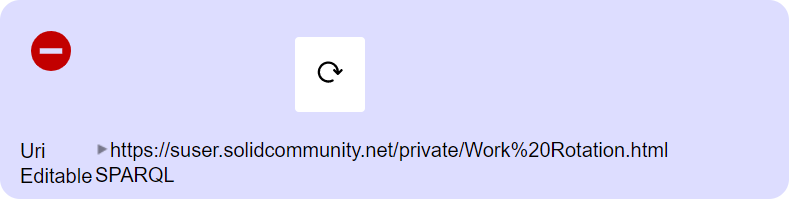
The Under the Hood view displays technical information about resources that is useful for debugging, development, and advanced data management. It shows the resource URL, provides direct editing capabilities, and allows you to delete resources.
Features
- Resource URL - View the full URL of the current resource
- Direct Edit Link - Open the resource in a direct editor
- Refresh - Reload the resource from the server
- Delete - Remove resources you have permission to delete
- Metadata Display - View technical details about the resource
Prerequisite
To access the Under the Hood view, you need Developer privileges:
- Log in to your Pod
- Click on your profile image to open the menu
- Click on Preferences
- Select Power user and Developer under User types
See User Roles for more information about user types.
Viewing Resource Information
The Under the Hood panel displays:
| Information | Description |
|---|---|
| Resource URL | The full URI of the current resource |
| Content Type | The MIME type of the resource (e.g., text/turtle) |
| Last Modified | When the resource was last changed |
| Edit Link | Direct link to edit the raw source |
This information is useful when:
- Sharing direct links to resources
- Debugging access issues
- Understanding the data structure
- Copying resource URIs for use in other applications
Refreshing a Resource
If data has been modified externally (by another app or user), you can refresh to see the latest version:
- Open the Under the Hood view
- Click the
 Refresh icon
 - The resource reloads from the server with any updates
Deleting a Resource
You can delete folders and data resources to which you have delete permission.
To delete a resource:
- Navigate to and open the resource you want to delete
- Click on the
 Under the Hood icon
 - Hover your mouse cursor to the left of the Refresh icon
- A
 Remove icon will appear
 - Click the Remove icon
- Confirm the deletion by clicking Delete file
Deletion is permanent. Make sure you have backups of important data before deleting.
Refresh your web browser after deletion for the change to appear in the Folder view.
Common Use Cases
Debugging Access Issues
When you can't access a resource, the Under the Hood view shows:
- The exact URL being requested
- Whether the resource exists
- Any error messages from the server
Copying Resource URIs
The displayed URL can be copied and used to:
- Share direct links with collaborators
- Reference resources in other Solid applications
- Create links in documents or chats
Verifying Data Updates
After making changes through other applications, use Refresh to verify the updates are saved correctly.
User Role
The Under the Hood view is available to users with the Developer role. See User Roles for more information.